Salesforce Winter ’24 Release Notes: Sales Cloud

The Salesforce Winter ’24 Release Notes for Sales Cloud gives sales teams a wave of innovation and improvements. From visualizing customers and prospects on a map for more efficient planning to harnessing AI-powered call summaries for enhanced customer interactions, the Sales Cloud release is full of features designed to empower your sales team. Learn the exciting new features below that can unlock Sales productivity and efficiency.

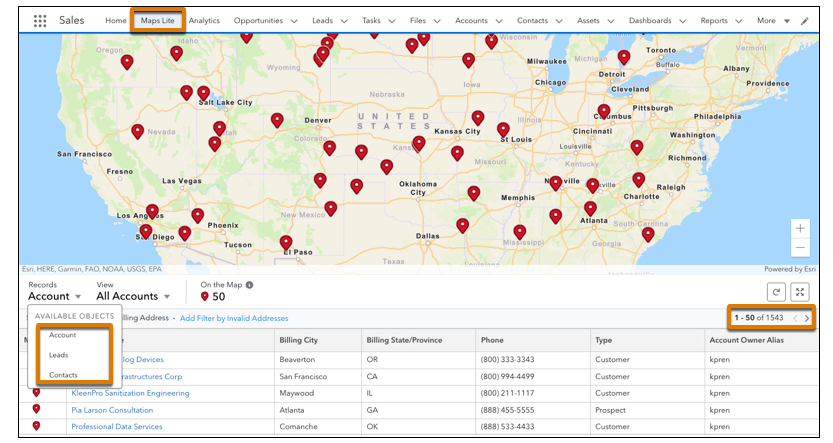
Visualize Customers and Prospects on a Map

Keep reps focused on meeting and exceeding sales targets as they plan for in-person and virtual visits with accounts, contacts, and leads in key geographic areas with Salesforce Maps Lite. Identifying customers and prospects on a map helps your reps better plan their routes with fewer miles and set up appointments with fewer gaps in their schedules.
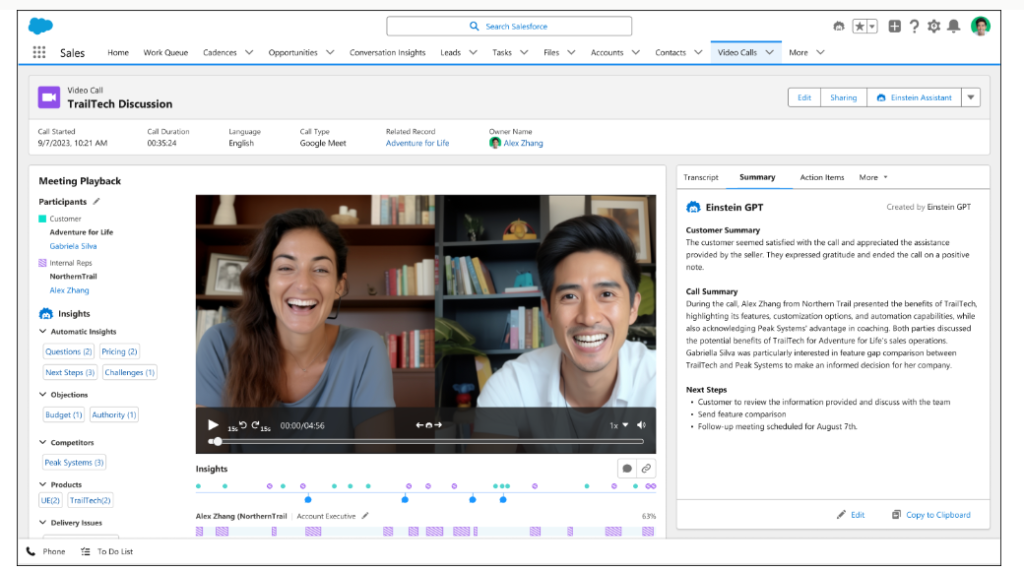
Create Call Summaries Powered by Einstein GPT

Want to harness the power of generative AI to create a snapshot of everything your teams need to know about a customer call? Einstein Conversation Insights users can create generative call summaries on voice and video calls. Powered by Einstein GPT, the new Summary tab on call records allows users to create editable summaries that include next steps and customer feedback, and share summaries for easier team collaborations in the flow of work.
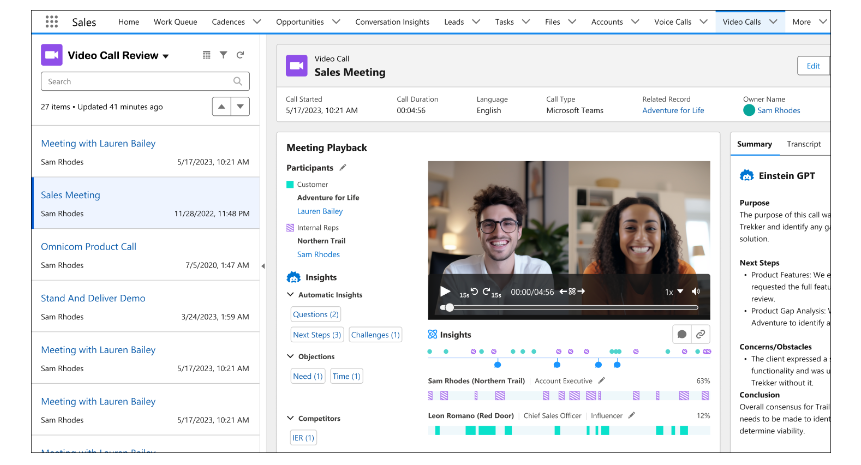
Review Calls with Ease

Sales managers and other Einstein Conversation Insights (ECI) users can quickly scan through a call list, viewing call details without needing to switch back-and-forth between a list view and a record detail view.
Monitor the Health of your Sales Engine

Track changes in your sales forecast in the Forecast Insights dashboard. Monitor velocity, pipe coverage, and other KPIs with period-over-period analysis.

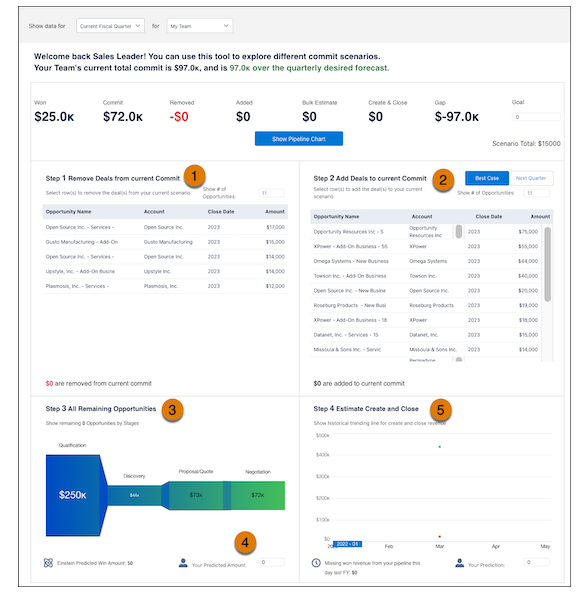
Explore Sales Scenarios with the Commit Calculator

Use the Commit Calculator to test different scenarios and understand how changes to your pipeline can affect your bottom line.
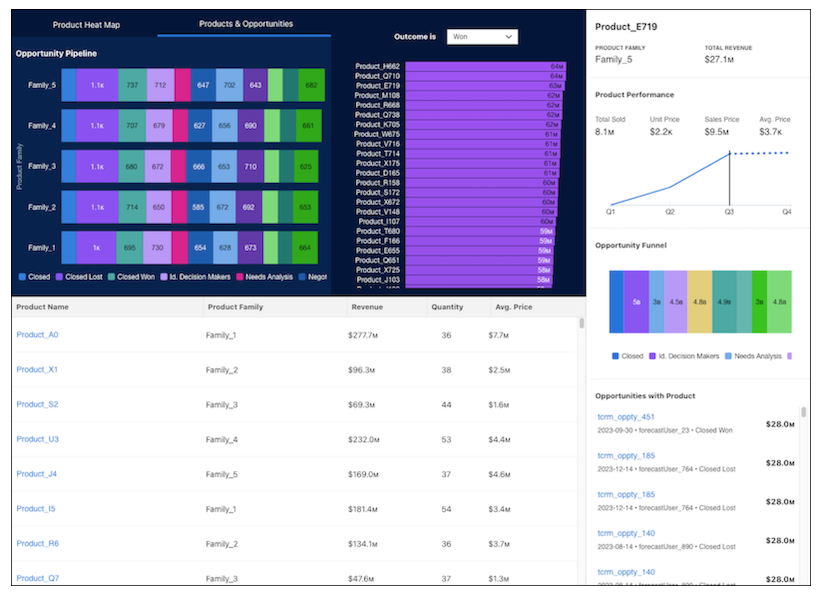
Understand How your Products Sell in Different Segments

Optimize your sales strategy using the Product Insights dashboard. Track customer purchases, opportunities to position products in new segments, and market trends. Quickly see how well your sales teams deliver new offerings to the market.
Keep Deals Moving by Involving the Right People

Sales managers and their sales reps want to understand deal health and risk, so they can increase their confidence that deals close on time and sales forecasts are accurate. Now you can tell at a glance who’s part of a deal. Learn whether the right stakeholders are involved for deals in your pipeline and how engaged they are.

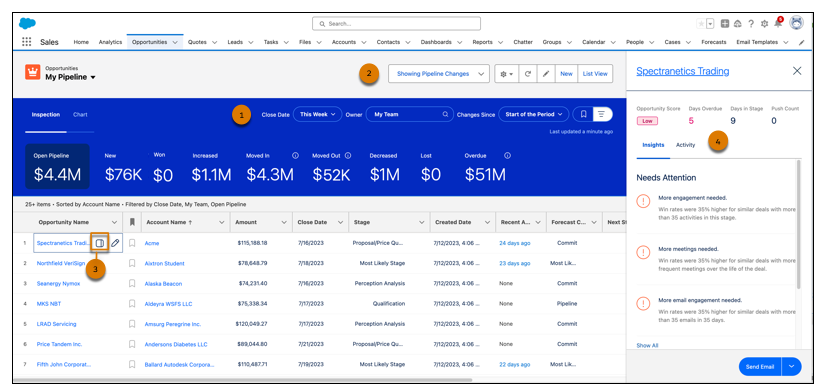
Speed Through Your Opportunities with a Revamped Pipeline Inspection Page

Get an improved experience with a refreshed Pipeline Inspection UI. A modern look makes Pipeline Inspection more intuitive and easier to navigate. Pipeline Inspection is automatically updated to the new version.
Improve Sales Forecast Accuracy with Manager Judgments

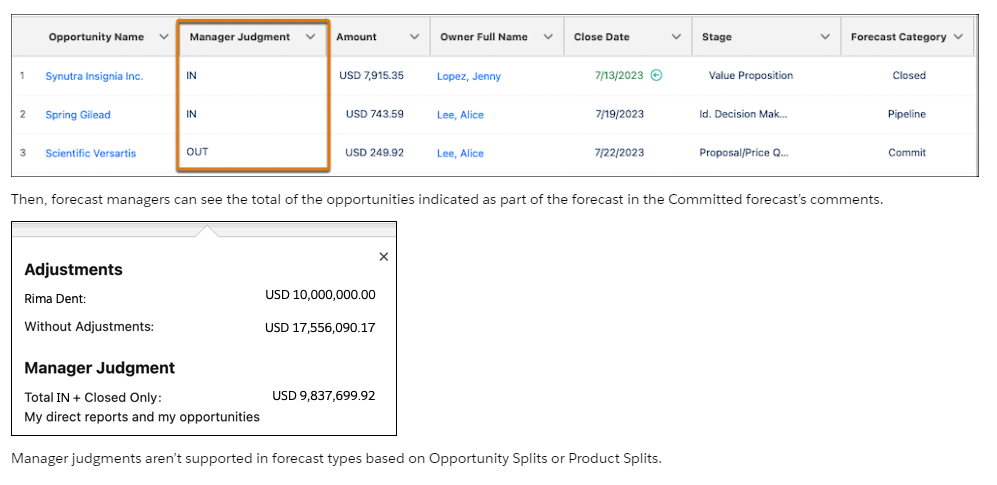
As part of forecast reviews and assessments, forecast managers can now apply their judgment to the opportunities in their forecasts to help them make more accurate and informed forecast adjustments. By applying judgment at the opportunity level, managers increase their visibility into which deals they have the highest confidence of closing. Previously, managers could adjust the committed forecast number only, and could see how their judgment influenced the adjusted forecast.
Get More Insight About Opportunities in Sales Forecasts

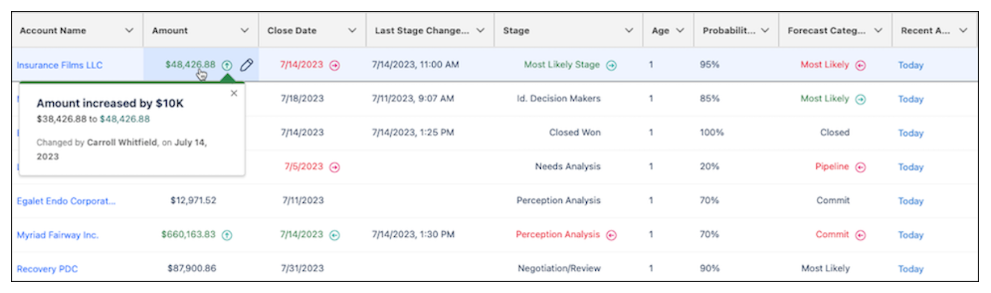
Gain a deeper understanding about the opportunities that make up your sales forecasts with enhanced details available when reviewing forecast rollup values. When viewing the grid view in the forecasts page, the opportunity list now includes the same information and the same edit capabilities that are available in Pipeline Inspection, without having to switch to the Pipeline Inspection page. Previously, forecast owners and sales managers opened Pipeline Inspection to dive deep into details about opportunities, such as activity updates and deal insights.
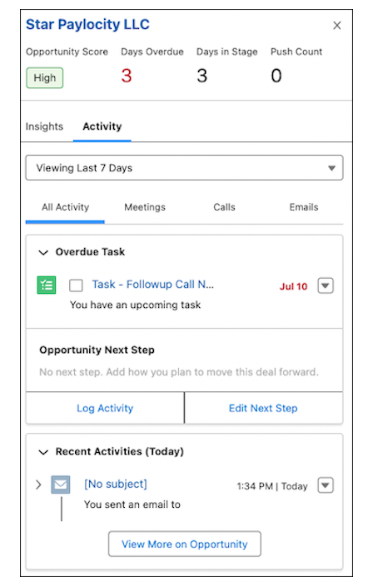
See Your Data Your Way in Workspace

Users can create and manage up to 10 personal workspace tabs to see data in a grid-like layout. In the list, users can sort, filter, and query the data, as well as update it. They have a choice of what type of data to show and how to show it in their workspace. After creating a tab, they can modify the workspace to show related data.

Salesforce for Outlook Is Retiring in June 2024

Full product retirement for Salesforce for Outlook is scheduled for June 2024. For the latest integration with Microsoft Outlook, we recommend moving to our next-generation products, the Outlook integration and Einstein Activity Capture. These products replace Salesforce for Outlook features and give users new capabilities. We continue to introduce enhancements for these products every release.

Meeting Studio Is Being Retired

Meeting Studio is being retired with Spring ’24.

If you would like to learn more about the Salesforce Winter ’24 Release Notes for Sales Cloud, please contact us.

About Corrao Group

For two decades, Corrao Group has stood as a pillar of expertise, assisting B2B organizations across various industries and sizes in implementing and optimizing their business processes through Salesforce and integrated third-party applications. With an unwavering dedication spanning 21 years, we have cultivated a deep knowledge and understanding of Salesforce as power users ourselves. This recognition of Salesforce’s flexibility empowers us to cater to various departments’ needs, ensuring seamless alignment. Our mission is to seamlessly translate your business processes into Salesforce, promoting not only successful integration but also widespread user adoption.

Sources
Salesforce Winter ’24 Release Notes Sales Cloud

Salesforce Winter ’24 Release Notes: Retail Execution

The Salesforce Winter ’24 Release Notes are here, as they bring a host of innovations and enhancements! Among these updates, Consumer Goods Cloud Retail Execution introduces many transformative features set to streamline your retail operations. Explore the exciting possibilities the Retail Execution release notes hold for optimizing your retail and consumer goods processes.

Place Orders Efficiently

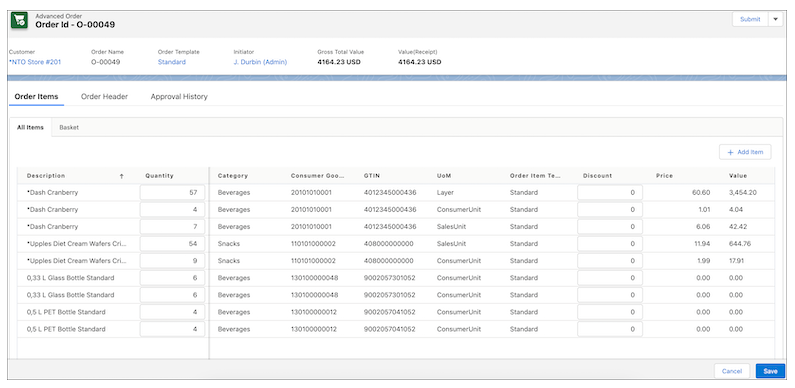
Use a prepopulated product list to select products easily from the Order Items window while placing a New Advanced Order. Products are prepopulated based on the authorization list of the relevant trade org nodes in the account hierarchy. Enter the quantities for the listed products directly without manual search and add products from the product master.

Use the new filters and customer attributes in customer lookup to perform an advanced search for customers and to select the right customer on the New Order window. Narrow down the search for products on the Add Items window by using the Description, Product Code, GTIN, Category, Brand, Promoted, and Listed filters. You can further search for products on the Order Items window by using Category, Brand, and Order Template.

Add Custom Attributes in Penny Perfect Pricing Calculation

Use the new object, Pricing Context Definition, to add custom attributes to the pricing context. Use the custom attributes to search for pricing conditions and in user exits.

Enhance Promotion Planning and Execution

Leverage advanced analytics to implement a promotional dashboard by using the additional metadata in the Job Definition Template object. Use the updated picklist values in the Primary Survey Policy field to analyze store participation, placement, and quality of the display of assets. Also, use the new Competitor Relevant field to analyze competitor situations (promotions, price, or placement of assets).

Easily Share Attachments in Consumer Goods Cloud Offline Mobile App

Use the app’s sharing feature to share attached files (with file types such as PDF, XLS and DOCX) from various tiles such as Customer, Sales Folder, Promotion, and Products.

Analyze the Trend and Effectiveness of Promotions

Customize the Related list to view the approval history of a promotion. You can effectively streamline, track, and manage the approval process for standard promotions.

Preview Signatures in the Print Layout

Use signature templates to configure the signature flow for an object and to include the signatures of multiple roles in the Print Layout. As an out-of-the-box solution, Order Confirmation PDF now includes the Store Manager’s signatures confirming the order. You can even create custom print layouts for other processes such as customer contracts and daily reports. We delivered this feature thanks to your ideas on IdeaExchange.

Additional Permissions for Sales Org

Using the additional metadata, get create and edit permissions on the Sales Org object. Starting with Winter ‘24, you’re no longer required to add these permissions manually.

Optimize the Settings of Your Mobile Synchronization

Experience the speed and reliability of the synchronization processes for large datasets between Salesforce and the Consumer Goods Cloud offline mobile app. Admins can set the increased default response time limit for the execution of batch SOQL and named fetch trees (NFT).

Allow Bluetooth Permissions for Consumer Goods Cloud Offline Mobile App in Android Devices

Make sure that you allow bluetooth permission after you upgrade to the Winter ’24 version of the Consumer Goods Cloud offline mobile app on your Android devices.

If you would like to learn more about the Salesforce Winter ’24 Release Notes for Retail Execution, please contact us.

About Corrao Group

For two decades, Corrao Group has stood as a pillar of expertise, assisting B2B organizations across various industries and sizes in implementing and optimizing their business processes through Salesforce and integrated third-party applications. With an unwavering dedication spanning 21 years, we have cultivated a deep knowledge and understanding of Salesforce as power users ourselves. This recognition of Salesforce’s flexibility empowers us to cater to various departments’ needs, ensuring seamless alignment. Our mission is to seamlessly translate your business processes into Salesforce, promoting not only successful integration but also widespread user adoption.

Sources
Salesforce Winter ’24 Release Notes Retail Execution

Salesforce Winter ’24 Release Notes: Trade Promotion Management

It’s that exciting time again as we reveal the much-anticipated Salesforce Winter ’24 Release Notes, bringing a ripple of innovation and improvements. Amidst all of the features and cloud enhancements, there’s one area that’s catching our attention: Trade Promotion Management. The spotlight is on Trade Promotion Optimization (TPO), a game-changing feature that can help consumer goods companies improve the effectiveness of their trade promotion strategies. Let’s dive into the latest enhancements and features for Salesforce Trade Promotion Management.

Improve Performance of Promotions By Predicting the Sales Uplift Volume

Improve the effectiveness of trade promotion strategies by predicting the sales uplift volume for each promotion. Use these predictions to understand the impact of a particular combination of promotional tactics and attributes, improve the uplift volume by changing the promotional tactics for products, and maximize your investments in trade promotions.

Easily Identify Custom Periods by Using Custom Labels

Enable custom labels in your Sales org to use a custom period’s short description as a label. See the custom labels in various views in Trade Promotion Management, including Trade Calendar, promotion P&L views, volume planning cards, spend planning cards, account plans, customer business plans, and real-time reports.

Choose the Best Scenario for Your Customer Business Plan

Create scenarios in your customer business plan (CBP) while planning for current and future financial years. Easily exclude promotions from a scenario and manually adjust key performance indicators (KPIs) to simulate different strategies. Compare KPIs from different scenarios and activate a suitable scenario to maximize your revenue and sales.

Understand the Calculations Behind Your Promotion’s Profit and Loss

Use APIs to analyze information related to your promotion’s Profit and Loss calculations, including both raw data and calculated key performance indicators (KPIs). Review the source KPIs, calculation variables, and formulas used in the calculated KPIs. See how weekly values are distributed into daily values.

Export Key Performance Indicator Grids Using APIs

Use APIs to export Key Performance Indicator (KPI) grids in Trade Promotion Management. The APIs can trigger calculation events and retrieve KPI information based on product levels, subsets, periods, and period types. Retrieve data for a specific period in JSON, serialized JSON, or CSV format.

Gain Valuable Insights with Better Visibility into Bill of Material Products and Components

Export component level key performance indicators (KPIs) with their associated components in a CSV file. The exported CSV file contains information about promotions and their associated bill of material components, along with a field that indicates whether a product is a bill of material or not.

Add Product Attributes in Real-Time Reports

Define the product attributes that are available in a real-time report based on your specific requirements. Show additional product attributes, such as Product ID, Product Code, or global trade item number (GTIN), in a real-time report. Previously, real-time reports used only the product dimension, and you couldn’t define multiple product levels in the product hierarchy.

Use Real-Time Reports More Intuitively

Real-time reports in Trade Promotion Management now show totals at the top of the details section of a Key Performance Indicator (KPI) report, instead of at the bottom. If a promotion or tactic falls within the selected report time frame by at least one day, it’s included in the KPI report.

Get Intelligent Document Reader with Trade Promotion Management

Automatically extract information from uploaded documents by using Amazon Textract through your AWS account. Use the extracted information to create or update record fields, or to verify data that’s already in Salesforce.

Updates for Permission Sets

Improvements have been made to the permissions that are assigned to CGCloud Finance Admin, CGCloud Business Admin, CGCloud Finance User, and CGCloud Finance Manager permission sets to provide better access control. The CGCloud Refresh Update Activation Service permission set is no longer available in Trade Promotion Management.

If you would like to learn more about the Salesforce Winter ’24 Release Notes for Trade Promotion Management, please contact us.

About Corrao Group

For two decades, Corrao Group has stood as a pillar of expertise, assisting B2B organizations across various industries and sizes in implementing and optimizing their business processes through Salesforce and integrated third-party applications. With an unwavering dedication spanning 21 years, we have cultivated a deep knowledge and understanding of Salesforce as power users ourselves. This recognition of Salesforce’s flexibility empowers us to cater to various departments’ needs, ensuring seamless alignment. Our mission is to seamlessly translate your business processes into Salesforce, promoting not only successful integration but also widespread user adoption.

Sources
Salesforce Winter ’24 Release Notes Trade Promotion Management

Salesforce Winter ’24 Release Notes: Analytics

The Salesforce Winter ’24 Release Notes for Analytics brings exciting new features to improve data-driven decision-making. From the seamless integration of Tableau views in CRM Analytics dashboards with custom filters, to the improved navigation experience, these features empower your team to navigate complex data sets easily. Learn more as we explore the release of Salesforce Analytics, and Reports & Dashboards.

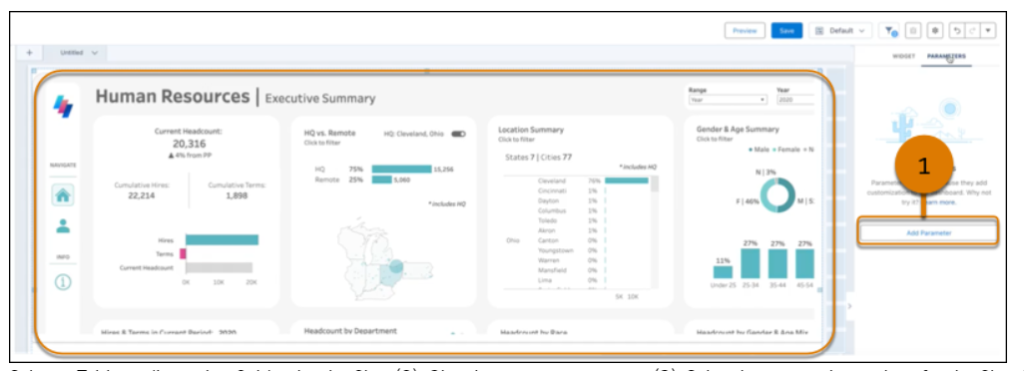
Explore Tableau Views in CRM Analytics Dashboards With Custom Filters (Beta)

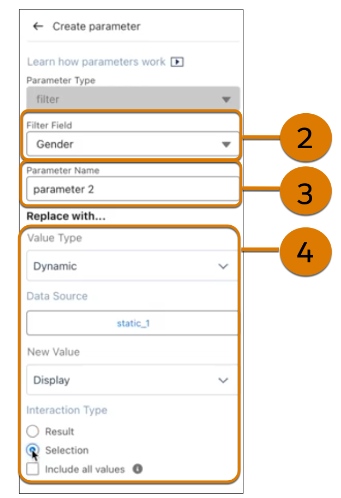
You can now add custom filters to explore Tableau views within dashboard components and unlock additional insights. Instead of generating multiple component views to support different data scenarios, add a filter parameter to interact with static values or a filter in a CRM Analytics dashboard. Maintain a single Tableau view without creating and switching between different views.

View Report and Dashboard Asset Details From the Analytics Tab

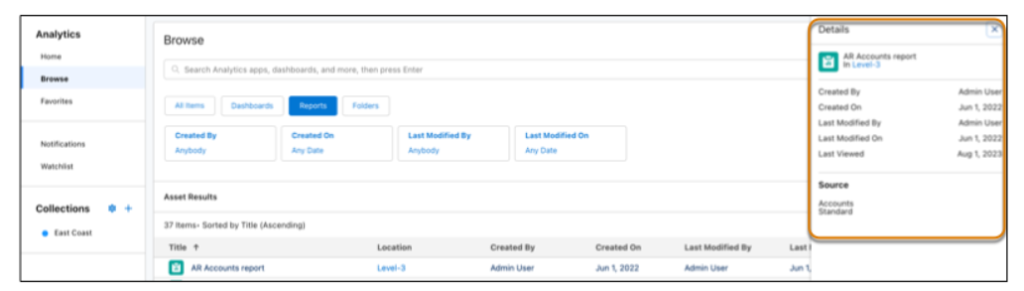
Use Asset Details to view metadata for your reports and dashboards, such as create date and owner. Asset Details also include data sources to help you differentiate between reports created with Salesforce and Data Cloud.

Refine Your Search Results with Sort

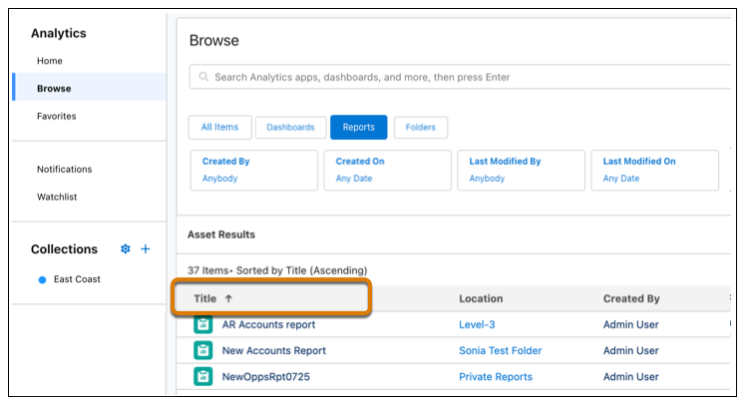
Find what you need faster by sorting the column headers in your search results. You no longer have to scroll through pages of reports, dashboards, and CRM Analytics assets to find what you want. We delivered this feature thanks to your ideas on IdeaExchange.

Experience the Improved Home Tab in CRM Analytics for Slack

Get reduced clutter and boosted Home tab performance with the new way to access subscriptions and notifications in Slack. In the reorganized Home tab, your lists of subscriptions and notifications are now available in separate windows. Previously, these lists filled the app’s Home tab.

Experience Improved Table Performance with Pagination

Your dashboard tables are now more responsive and load faster. Pagination of table results limits the amount of data loaded up front. As users page through the table results, more data loads as needed.

Reset Dashboard Navigation with the Clear Selections Interaction

Let dashboard users quickly return to the start of a curated journey with a single click. When you build a navigation flow, you can now add the Clear Selections action. After drilling deep into a navigation flow, users can easily return to the initial state. Clear Selections is only available for text widgets.

Optimize Quote to Order Process by Using Process Visualizations

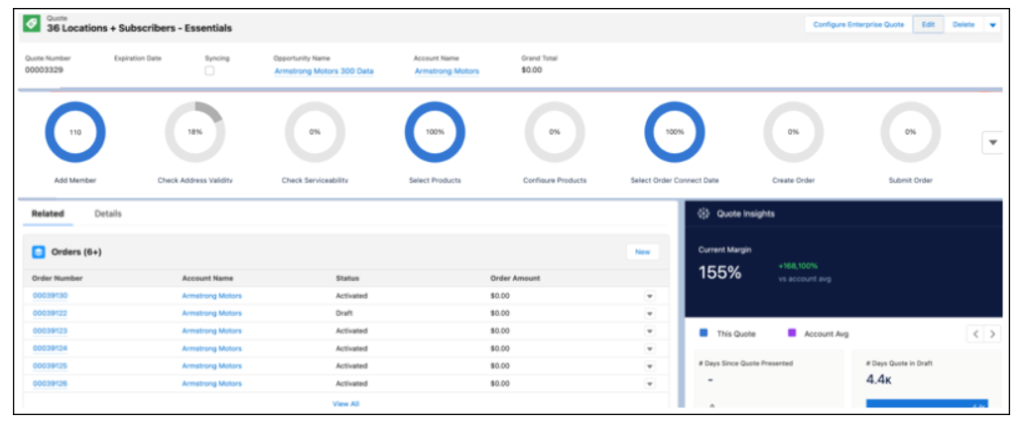
Get a comprehensive view of your quote process and analyze each step to identify missing data and streamline task completion. The process visualization dashboard is seamlessly integrated into the Quote to Order guided setup and helps you identify areas that need attention.

If you would like to learn more about the Salesforce Winter ’24 Release Notes for Analytics, please contact us.

About Corrao Group

For two decades, Corrao Group has stood as a pillar of expertise, assisting B2B organizations across various industries and sizes in implementing and optimizing their business processes through Salesforce and integrated third-party applications. With an unwavering dedication spanning 21 years, we have cultivated a deep knowledge and understanding of Salesforce as power users ourselves. This recognition of Salesforce’s flexibility empowers us to cater to various departments’ needs, ensuring seamless alignment. Our mission is to seamlessly translate your business processes into Salesforce, promoting not only successful integration but also widespread user adoption.

Sources
Salesforce Winter ’24 Release Notes Analytics

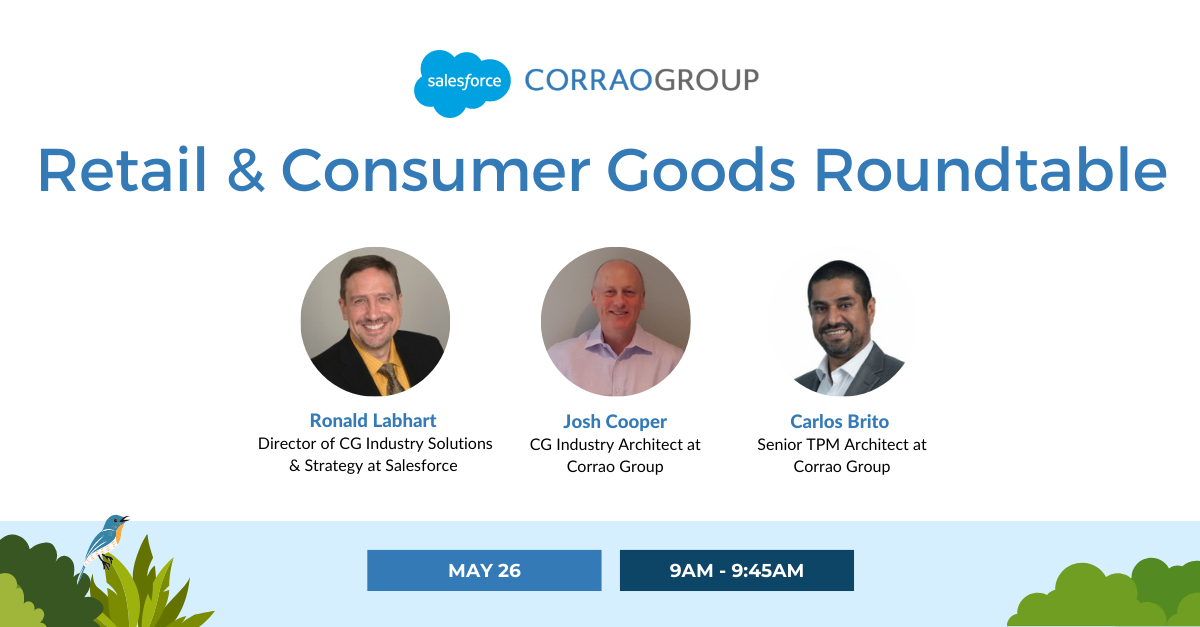
Retail & Consumer Goods Roundtable

Join us for an exclusive webinar in collaboration with Salesforce, where we delve into the pressing pain points of the planning and forecasting process for RCG companies. In this insightful 45-minute session, we will take a look at the challenges businesses face and the significant impact these obstacles have on overall performance.

One of the pain points discussed during the webinar will be the ongoing struggles when planning and forecasting within Excel. Many organizations heavily rely on spreadsheets, but this approach often leads to major inefficiencies and errors. We will explore the limitations of Excel and offer alternatives that can streamline processes and improve accuracy.

Accurate forecasting is a critical aspect of effective planning, and we will address the challenges associated with achieving precise forecasts. From unpredictable market trends to changing consumer demands, businesses encounter obstacles that impede their ability to generate reliable predictions. Our webinar will provide insights into how Salesforce Customer Planning and Forecasting can help overcome these obstacles, enabling businesses to make data-driven decisions with confidence.

Another prevalent pain point is the lack of visibility across various departments and functions within an organization. Outdated processes and siloed technology often obstruct seamless collaboration and hinder decision-making. We will discuss strategies to break down these obstacles and demonstrate how Salesforce’s solutions can provide instant visibility, fostering a cohesive and collaborative environment.

Additionally, the webinar will shed light on the importance of adaptability to market changes. In today’s dynamic business landscape, organizations must be prepared to respond swiftly and adjust their strategies to meet evolving customer needs. We will showcase how Salesforce’s technology equips businesses with the agility to adapt to market shifts efficiently.

By participating in this webinar, you will gain invaluable knowledge about the pain points faced by the retail and consumer goods industries and the corresponding solutions offered by Salesforce. Equipped with accurate forecasting, enhanced visibility, and state-of-the-art technology, you will be empowered to stay ahead of the competition.

Don’t miss out on this extraordinary opportunity to transform your company. Register now and embark on a journey toward unlocking the full potential of your business with Salesforce.

About Corrao Group

As everyday Salesforce power users, Corrao Group understands how flexible the Salesforce platform is to support every business department. Since 2002, we have been helping B2B organizations of all sizes optimize their business processes with Salesforce and their third-party applications. We’ve worked with nearly 1,100+ customers, implementing, customizing, and optimizing over 2,150+ Salesforce projects. We are proud to be on the Consumer Goods Cloud Partner Advisory Board and Salesforce Managed Service Board, in addition to being the exclusive US launch partner of the Salesforce Trade Promotion Management (TPM) Pilot. If you want to learn more about how Corrao Group can help your company, read our reviews on G2!

Streamlining Planning & Forecasting with Salesforce CPF

Sales planning and forecasting is a crucial aspect of any business, as it helps organizations anticipate their future sales and align their resources accordingly. However, the traditional approach to this process can be tedious, time-consuming, and error-prone, leading to frustration for CEOs, marketing teams, sales managers, product managers, and financial teams. Fortunately, with advancements in technology, there is a more efficient and accurate solution. In this blog, we will explore the pain points of the sales planning and forecasting process and how Salesforce customer planning and forecasting (CPF) can streamline the entire process, saving time and providing more accurate predictions for all involved parties.

CEO
The CEO is typically responsible for setting the overall strategy of the company, including sales and marketing goals. They may have final approval on all major decisions related to customer planning and forecasting. Even though they’re not as hands-on in the planning and forecasting process as Sales Managers and Product Managers are, they still have issues that can be solved with an enhanced customer planning and forecasting tool.

    • Lack of visibility into departmental progress: Since they’re not as involved in the process, CEOs need to be able to review the progress of each department when it’s convenient for them. Due to running the company, sometimes that review time comes at 8 pm or other times when their employees aren’t working. They can’t afford to wait for department heads to both collect and then send the necessary information. At that point, the data is already outdated and could be filled with manual errors.
      • How Salesforce CPF helps: Salesforce CPF provides a platform where CEOs can check in on the progress of each department at any time of the day with confidence that the data is in real-time. This helps them know which delegation activities work best for certain department heads, and reveal those that need improvement.
    • Outdated Technology: Unbeknownst to most CEOs, the planning and forecasting technology their company uses is hindering their team’s performance and costing them revenue. Spreadsheets continue to become outdated as consumer behavior has drastically changed since 2019. This technology can’t support the thousands of equations required within the forecasting process. And using multiple, disconnected systems to accomplish this entire process is too time-consuming and error-prone.
      • How Salesforce CPF helps: Salesforce CPF is the ultimate tool to run every step of the sales planning and forecasting process in today’s world. With three major updates per year, CEOs can be confident that the tool is always staying up to date with the consumers constantly changing behavior. Salesforce also does a great job of listening to their customer’s requests so these system updates contain requests from people actually using the tool. Salesforce CPF provides companies with one centralized area for both internal and external teams to collaborate on and view their KPIs in real time. CEOs can jump in at any time to see the ongoing process and comment if they need to. The advanced tool can also support custom equations required in the planning and forecasting process. This information can automatically be analyzed and displayed in reports & dashboards so CEOs can review them at any time of the day without needing to wait.
    • KPI Reports and Dashboards: Typically, CEOs need to wait for meetings with department heads to view sales planning and forecasting KPIs. It takes time to gather this information, and then even more time to prepare it for a presentation.
      • How Salesforce CPF helps: Salesforce CPF provides one dashboard for CEOs to view all KPIs in real time. Comprised of multiple reports, this dashboard can be modified exactly how the viewer would like. It can contain out-of-the-box reports as well as the company’s custom KPIs.

Sales Manager
Sales managers are responsible for managing the sales team and ensuring that sales goals are met. They are heavily involved in creating and reviewing sales forecasts. The CSO oversees the sales team and is responsible for meeting revenue targets.

    • Inaccurate Data: Accurate data is always required to forecast sales but too often Sales Managers face challenges in obtaining access to this. Data is either already outdated by the time it reaches the Sales Manager, or there is simply not enough. Inaccurate or incomplete data leads to inaccurate sales forecasts, severely impacting the overall sales strategy.
      • How Salesforce CPF helps: Salesforce CPF provides a centralized platform for all customer data: purchase history, preferences, demographics, and much more. This reduces the likelihood of data errors caused by hosting this info across siloed systems. CPF provides real-time reports and dashboards to track the progress of each department and make data-driven decisions based on accurate data.
    • Inefficient & Manual Processes: The sales planning and forecasting process is extremely time-consuming and complex, which tends to lead to inefficiencies across the board. There are many players involved in the process, leading to additional errors. Sales managers often have to manually gather and consolidate data from multiple sources, a tedious and error-prone process.
      • How Salesforce CPF helps: Salesforce CPF speeds up manual tasks via automated data collection and analysis, real-time updates and alerts, forecasting accuracy, and enhanced collaboration and communication. It also gives clients AI-powered forecasting capabilities that use algorithms to analyze historical data, current trends, and additional critical info. This eliminates the need for error-prone manual data entry and saves Sales managers tons of time.
    • Poor Team Collaboration: Sales forecasts constantly need to be communicated to stakeholders but poor communication can lead to misunderstandings and misalignments. Departments need to be completely transparent as certain processes can’t be started until others are completed correctly. Constant communication helps fellow department heads with expectations so that they can hit the ground running when they need to contribute. Sales Managers need to ensure that all stakeholders are on the same page to execute sales forecasting quickly and accurately.
      • How Salesforce CPF helps: Email notifications containing the latest sales forecasting updates can automatically be scheduled to send to key members. These notifications can be customized to show the details each client prefers. The data is in real-time so that reports aren’t already outdated as they are with archaic systems such as Excel and others.
    • Limited Visibility: Sales Managers require visibility into the sales pipeline to accurately forecast future sales, but often, they may not have complete visibility. Some parts may require information to be sent from colleagues, slowing the process down. Not having access to all of the data makes it difficult to identify potential roadblocks and opportunities for improvement.
      • How Salesforce CPF helps: Salesforce CPF gives Sales Managers a comprehensive view of every detail across each department that is related to the planning and forecasting process and sales pipeline. Without the need to access different systems to view key data, this rapidly accelerates the planning process and reduces the manual time spent consolidating the data into one view.
    • Unforeseen Market Changes: Unforeseen market changes can drastically impact sales forecasts and catch everyone off guard. These changes include economic factors, changes in consumer behavior, and shifts in the competitive landscape. Sales Managers need to adapt quickly to these changes and adjust their forecasts accordingly. The problem is, no human can accurately predict what’s going to happen in the future.
      • How Salesforce CPF helps: Scenario Planning within CPF helps create different scenarios and models to simulate the impact of possible market changes on one’s sales performance. This helps Sales Managers understand the potential risks and opportunities associated with different market scenarios. If these market changes happen, Sales Managers are well prepared to adjust to “plan B” without major profit loss.

Financial Teams
Financial analysts may be involved in creating financial models and analyzing data to help inform sales forecasts.

    • Disconnected Systems and Processes: 77% of planning processes depend on having access to accurate data. As Excel spreadsheets quickly become outdated daily, finance teams need to ensure their data is always updated. Consolidating data from multiple sources is time-consuming and extremely error-prone. By the time the data is collected and consolidated, it can already be outdated upon sharing it with other teams. Forwarding inaccurate data to other departments only continues to decrease the accuracy of the overall sales forecast. Excel spreadsheets also can’t support the infinite number of calculations and macros that a professional planning and forecasting tool can.
      • How Salesforce CPF helps: Salesforce CPF gives companies one platform for all internal and external departments to run every step of the planning and forecasting process within. All data within the tool is up to date and accessible at any time of the day. So financial teams can access data after hours without needing to wait for other team members to provide them with the necessary info.
    • Time-Consuming Manual Tasks: Finance teams can’t afford any slow-downs within their processes. They need to generate timely insights, but many teams spend too much time sorting and organizing data instead of actually analyzing it.
      • How Salesforce CPF helps: CPF provides financial teams with the power of bringing their own custom processes onto the Salesforce platform, streamlining it for maximum efficiency. This also keeps all members of the finance team on the same page, where other departments (heads) can also see how things are progressing in real-time. This allows them to get prepared to either act on the incoming data or provide whatever is needed to the finance team.
    • Lack of Team/Departmental Collaboration: Finance teams rely on information provided by other departments to do their job, and vice versa. When companies use multiple systems for planning and forecasting, info-sharing is slowed down tremendously.
      • How Salesforce CPF helps: Real-time data gives all departments insight into the information provided by their peers in separate departments. Finance doesn’t need to wait “X” days for a sales report to come in; they can simply grab this info within Salesforce at any time of the day. Collaborative forecasting enables companies to move away from disparate and isolated forecasting activities to a unified, real-time enterprise forecasting process.
    • Outdated Information: Finance needs up-to-the-minute information and they are under constant pressure to deliver these actionable insights to assist in decision-making. The lack of accurate, real-time data limits the level of detail that financial planning systems can provide.
      • How Salesforce CPF helps: Salesforce CPF helps with self-service analytics to enable real-time reporting, assisting finance teams in understanding which revenue sources are underperforming, how to improve operational efficiencies, analyze the company’s performance, and develop an achievable plan for driving growth.

Product Managers
Product managers may be involved in forecasting demand for products or services to ensure that production and delivery processes run smoothly. Operations managers may be involved in forecasting demand for products or services to ensure that production and delivery processes run smoothly.

    • Inaccurate Data: Without accurate data, PMs are essentially working in the dark to develop and ship successful products. Bad data makes it difficult to make informed decisions, making it harder to move forward strategically and accurately. These manual efforts are typically error-prone.
      • How Salesforce CPF helps: Salesforce CPF provides one system to hold all key data: customer info, market research, user info, and product info. This ensures data is accurate and up to date. The tool also eliminates the constant human-caused errors and gives PMs extra time to focus on major tasks while Salesforce CPF takes care of the tedious, repetitive ones.
    • Forecasting Delivery & Timelines: There are too many variables that it’s nearly impossible to manually predict an accurate delivery timeline. Humans also tend to underestimate the time it takes to accomplish a task. This risks overpromising and under-delivering.
      • How Salesforce CPF helps: CPF helps accurately build timelines based on historical data, and future predictions. These have already been shown to be more accurate than predictions made by humans. Timelines are shared in the system for quick adjustments that can be viewed and sent out immediately.
    • Aligning Teams and Getting Buy-In: All department leaders have different objectives and priorities, leading to competing visions for the product’s direction. PMs need to navigate these priorities and bridge the gap between teams, stakeholders, and leaders. Without a centralized hub, PMs and department leaders are disconnected and can’t execute what needs to be done through emails and spreadsheets.
      • How Salesforce CPF helps: Salesforce CPF provides a centralized platform for all key leaders and stakeholders to view both company-wide and departmental KPIs in real-time. No more waiting for spreadsheets to be built, cleaned up, and shared by each department, containing outdated info by the time it reaches the recipient.
    • Overwhelming Product Backlog: PMs need the entire product backlog to be visible, transparent, and clear to all stakeholders and developers. Without this, they risk misalignment of the entire team’s goals, accountabilities, and deadlines.
      • How Salesforce CPF helps: The Product Roadmap provides companies with complete, real-time transparency throughout the entire process. This keeps everyone in the know, 24/7. Real-time updates can be scheduled to send automatically, or at the click of a button, alerting all appropriate teams of key updates.

CMO
The CMO is responsible for developing and implementing the company’s marketing strategy. They may be involved in market research and analysis to inform the customer planning and forecasting process. Marketing managers may be responsible for conducting market research and analyzing customer data to inform the customer planning and forecasting process.

    • Review Sales History and Make Predictions: Marketers need to utilize past sales data to help provide predictions to sales teams for the upcoming period. Having to wait for, and comb through multiple spreadsheets is too time-consuming and error-prone. Today’s marketers need a system that can streamline this process.
      • How Salesforce CPF helps: Salesforce CPF holds all historical sales data across different departments of the company that is available 24/7. Marketers no longer have to wait for sales teams to find and clean up their spreadsheets before sharing them. CPF’s platform provides a collaborative area where marketers can ask questions, and see other questions from all departments that may help them accomplish their goals.
    • Provide Historical Campaign Data: Which marketing campaigns had the highest ROI? Which ones underperformed? Marketers need to gather this data, run an analysis, and debrief sales on the findings. Without a centralized platform to hold these details, marketers are using outdated information in their process. This information is key in letting sales teams know which content pieces and marketing campaigns resonate best with customers.
      • How Salesforce CPF helps: The Salesforce CPF platform provides one place to hold all key campaign data: internal/external costs, revenue, and any custom information. Advanced analytics can accomplish in just minutes what takes human marketers days, sometimes weeks to complete in regards to campaign analysis. Prediction models can provide accurate predictions on how proposed marketing campaigns will perform in the upcoming period(s).
    • Tracking Always-Changing Customer Data: Marketers are responsible for collecting historical customer behavior, analyzing it, and providing predictions for the upcoming period. They need to provide the optimal price for a product based on this market research combined with their competitive landscape. With customer behavior constantly changing, this is an extremely time-consuming effort.
      • How Salesforce CPF helps: With CPF, marketers have all the historical customer data in one place. The tool can analyze the data, revealing certain trends and insights that the human eye may not catch. This is all done quicker and more accurately than any human can do. Salesforce CPF can take the analysis and provide marketers with predictions for the year which can then be shared with sales teams. This action saves days’ worth of time.

In conclusion, the sales planning and forecasting process can be a daunting task for businesses, but it is a necessary one to ensure success. The traditional approach can be archaic, time-consuming, and error-prone, leading to frustration and inefficiencies. By adopting Salesforce customer planning and forecasting, businesses can streamline the entire process, freeing up time for all department heads and providing more accurate predictions. With its advanced capabilities, businesses can make informed decisions, meet sales targets, and stay ahead of the competition. By embracing technology and innovation, businesses can take control of their sales planning and forecasting process and position themselves for growth and success.

Salesforce Summer ’23 Release: Analytics

The Salesforce Summer ’23 Release notes have arrived! The latest update for Analytics introduces many new features and improvements. From unifying all your analytics in the updated Analytics home to improving recommendations with Decision Optimization, these features will take your analytics to the next level. Keep reading to learn more about the top updates for Salesforce Analytics in the Summer ’23 Release.

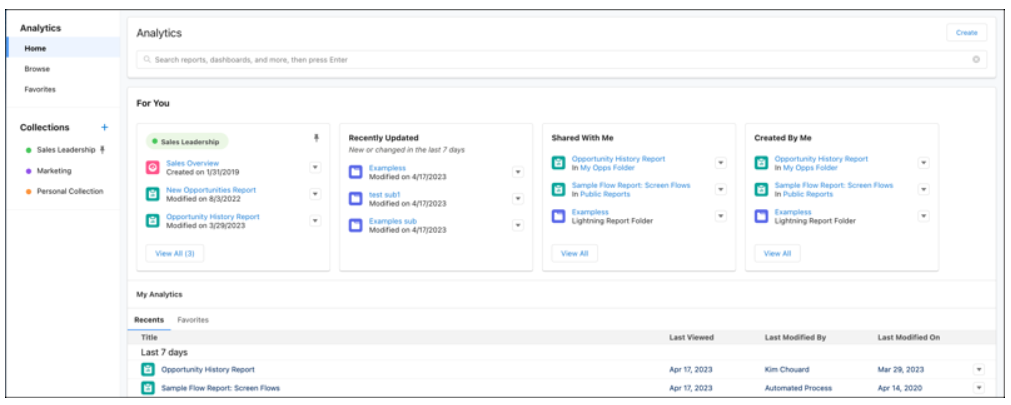
Unify All Your Analytics in the Analytics Home (Generally Available)

Rather than managing analytics scattered across different tools, find what you need in the updated Analytics home. This personalized environment for CRM Analytics and reports and dashboards organizes all your content in a cohesive and intelligent experience. Go to See Also to learn more about the reimagined Analytics home for CRM Analytics and reports and dashboards.

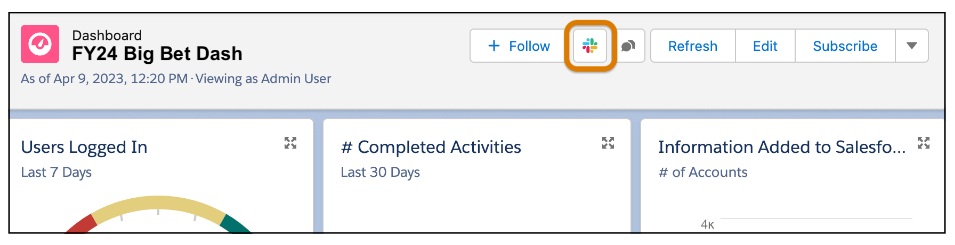
Post Lightning Dashboards with CRM Analytics for Slack

Share analytics with colleagues across your Slack workspaces and channels. Recipients can view dashboard details, share, subscribe, view a real-time snapshot of the dashboard, and quickly open the dashboard in Salesforce.

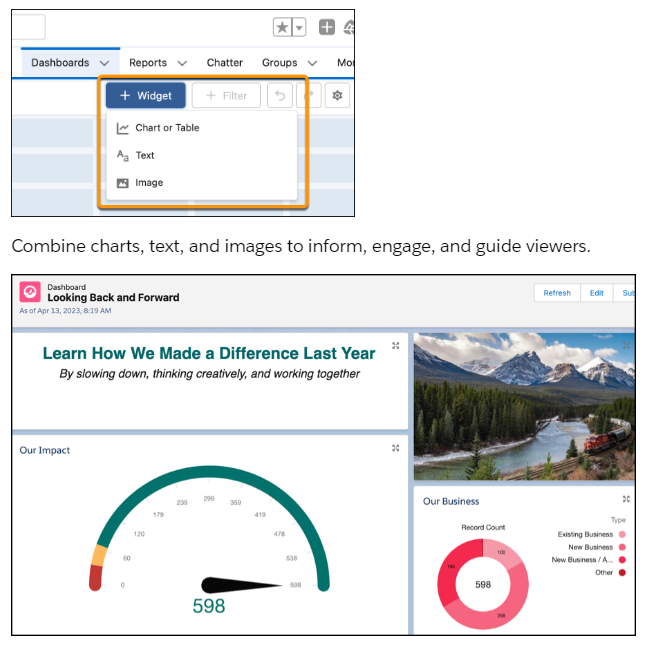
Enhance Your Visualizations with Images, Rich Text, and Dashboard Widgets

Explain Lightning dashboard charts, describe metrics and KPIs, and clarify tables with rich text right where users need it. Add company logos and branding, flow diagrams, and embedded images. Guide users through their data with section titles, narrative text, and even animated GIFs. Components are now called widgets in Unlimited Edition. Dashboards now support up to 25 widgets, including a maximum of 20 charts and tables, 2 images, and 25 rich text widgets. The previous limit was 20 in total.

Focus Your View with More Dashboard Filters

Save time and effort and reduce dashboard redundancy. No more cloning dashboards for different teams and business units. Refine and target your dashboard data with up to five filters on Lightning dashboards. The previous limit was three filters.

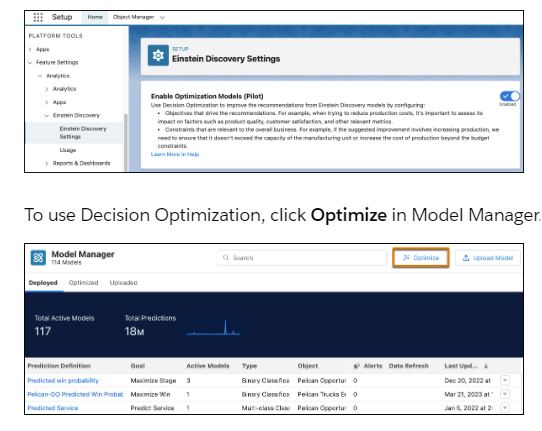
Improve Recommendations with Decision Optimization (Beta)

Control Einstein’s suggested improvements by incorporating your business rules, objectives, and constraints to ensure that the recommendations are relevant, feasible, and aligned with the big picture. For example, send field service reps to improve customer satisfaction while limiting the number of appointments. Or, focus your sales reps on maximizing revenue and not just their win rate by optimizing for opportunity amount and suggesting actions within time limits and budget constraints.

Learn More about the Salesforce Summer ’23 Release Notes

If you want to learn more about the exciting new features of the Salesforce Summer ’23 Release for Analytics, don’t hesitate to contact us and we’ll be happy to provide you with all the information you need.

About Corrao Group

As everyday Salesforce power users, Corrao Group understands how flexible the Salesforce platform is to support every business department. Since 2002, we have been helping B2B organizations of all sizes optimize their business processes with Salesforce and their third-party applications. We’ve worked with nearly 1,100+ customers, implementing, customizing, and optimizing over 2,150+ Salesforce projects. We are proud to be on the Consumer Goods Cloud Partner Advisory Board and Salesforce Managed Service Board, in addition to being the exclusive US launch partner of the Salesforce Trade Promotion Management (TPM) Pilot. If you want to learn more about how Corrao Group can help your company, read our reviews on G2!

Sources
Salesforce Summer ’23 Release: Analytics


Salesforce Summer ’23 Release: Marketing Cloud Account Engagement

The Salesforce Summer ’23 Release is packed with new features and updates, and we’re here to highlight the key updates for Marketing Cloud Account Engagement. One exciting addition is the ability to trigger external actions after a prospect engagement, allowing for even more personalized and targeted marketing efforts. Plus, the Optimizer feature is now generally available and includes new tools to help keep your business units running smoothly. Keep reading to learn about additional updates, including the Prospect Change Monitor, the ability to convert dynamic lists to static, and more.

Trigger an External Action After a Prospect Engagement

Now you can trigger an external action on any Account Engagement asset that has a completion action. For example, after a prospect completes a sign-up form, you can register the prospect for a webinar. You can send a text message after a prospect clicks a custom redirect link or send an alert to your sales team when a prospect visits a pricing page.

Keep Your Account Engagement Business Unit Running Smoothly with Optimizer (Generally Available)

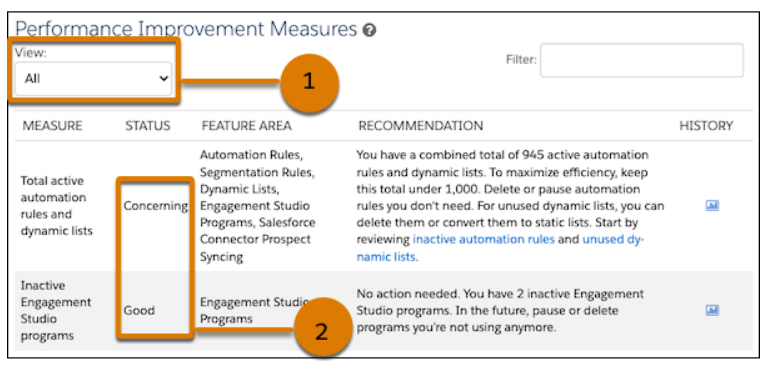
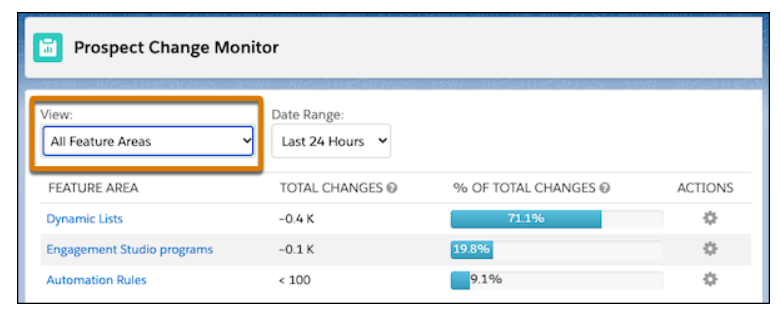
Get performance information, recommendations, and required steps on the Optimizer page when you need them. The Optimizer feature, now generally available, also includes some changes since the last release. Diagnose and treat setup problems that are blocking your access to features with the Configuration Issues table. The Performance Improvement Measures table now includes good measures so that you can see what’s working well in your business unit. Plus, the new Prospect Change Monitor helps you understand which features result in the most prospect changes for your business unit.

Monitor the Source of Prospect Changes

Find out which features are creating or updating prospect records in your business unit with the Prospect Change Monitor. Use the monitor to help you adjust your API integrations and automations that could be eating up processing power in your business unit. Access the Prospect Change Monitor from the Optimizer page in Account Engagement.

Convert Unused Dynamic Lists to Static Lists

Save processing power in your business unit by converting your old or unused dynamic lists to static lists. After you convert a dynamic list, you must manually add and remove prospects because the list no longer updates based on rule criteria. Select inactive or unused dynamic lists and use the table action dropdown menu to convert them to static. You can also convert individual lists from the record home.

Use a New Opted Out Field Status

Based on customer feedback, you can now use the most recently updated field value as a source of truth for the prospect Opted Out field. You also choose either Salesforce or Account Engagement to use as the system of record instead. Previously in the Spring ’23 release, selecting a system of record was required. Business units created after October 18, 2023 use the Account Engagement value by default.

Get First-Touch Attribution When Visitors Consent to Tracking

Tracking cookies are now added retroactively after a prospect confirms consent. Previously, tracking cookies were added before a prospect clicked the consent banner and then deleted if they didn’t consent.

Enhanced Builder Columns Are Evenly Spaced

The Enhanced Email Builder now aligns images evenly. Previously, the content in the far right column was wider and taller than the columns to the left. Check to see if images in email templates published before this update need to be adjusted.

Learn More about the Salesforce Summer ’23 Release Notes

If you want to learn more about the exciting new features of the Salesforce Summer ’23 Release for Marketing Cloud Account Engagement, don’t hesitate to contact us and we’ll be happy to provide you with all the information you need.

About Corrao Group

As everyday Salesforce power users, Corrao Group understands how flexible the Salesforce platform is to support every business department. Since 2002, we have been helping B2B organizations of all sizes optimize their business processes with Salesforce and their third-party applications. We’ve worked with nearly 1,100+ customers, implementing, customizing, and optimizing over 2,150+ Salesforce projects. We are proud to be on the Consumer Goods Cloud Partner Advisory Board and Salesforce Managed Service Board, in addition to being the exclusive US launch partner of the Salesforce Trade Promotion Management (TPM) Pilot. If you want to learn more about how Corrao Group can help your company, read our reviews on G2!

Sources

Salesforce Summer ’23 Release: Marketing Cloud Account Engagement

Salesforce Summer ’23 Release: Consumer Goods Cloud

Exciting news for Consumer Goods Cloud users! The Salesforce Summer ’23 Release has arrived, bringing some great features specifically designed for Consumer Goods Cloud TPM and Retail Execution. With improved customer service, enhanced analytics, and new tools to boost productivity, this release will surely improve the overall user experience for Consumer Goods Cloud users. Let’s dive into some of the key highlights of this release!

Improve Customer Satisfaction with Consumer Goods Cloud for Service

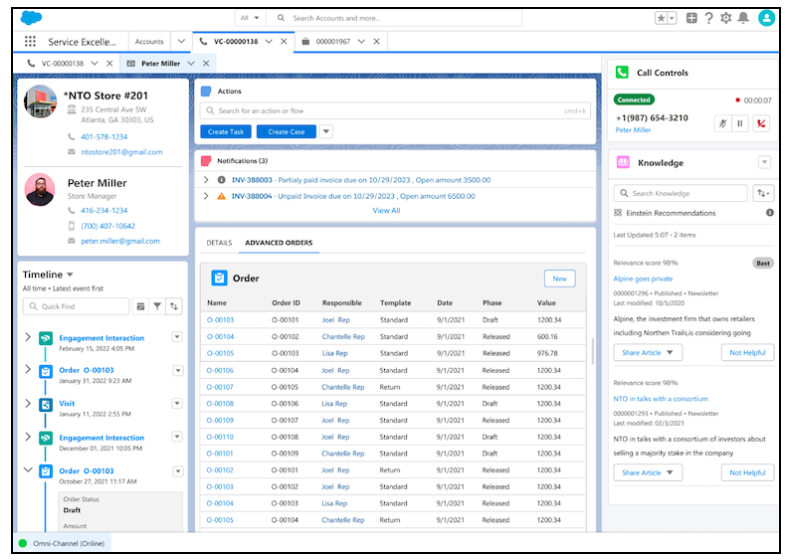
Give your service agents easy access to accounts, visits, orders, and engagement history records so that they have all the information necessary to plan and provide personalized customer service. Service agents can also drive revenue growth by placing orders over calls using Order Management and Penny Perfect Pricing.

Trade Promotion Management

Get Started with Trade Promotion Effectiveness

Use the new Trade Promotion Effectiveness (TPE) Analytics app to measure and monitor the effectiveness of your trade promotions. TPE dashboards help you make better business decisions, which leads to increased sales and revenue and improved customer satisfaction. Use standard CRMA dashboards to analyze data for volumes, assortments, spending, and tactics. Embed customized dashboards or widgets in specific Lightning Experience pages in TPM to provide in-context insights.

View Interactive Dashboards in Promotions

Use the TPM Promotion Analytics Dashboard component to embed dashboards and dashboard components in promotion pages. In edit mode, see interactive visualizations of your data and apply filters to the promotion’s displayed values and related records. Use JSON strings to specify types of filters or dashboard selections that you can’t create using the Filter Builder.

Make Quicker Decisions While Planning

When you modify promotions and manually adjust editable KPIs in a customer business plan (CBP), you can now quickly save and calculate your CBP. The CBP calculates data for the account and related promotions and displays the latest KPI metrics with the impact of your changes.

Plan Better By Evaluating Customer Business Plan Scenarios (Pilot)

Evaluate different customer business plan (CBP) scenarios to maximize revenue and sales while planning for current and future financial years. Use the active CBP to create multiple scenarios for evaluation. Exclude promotions from a scenario in the CBP to simulate different strategies.

Export More KPI Reports Simultaneously

Now you can export up to 10 KPI reports simultaneously instead of 5. The reports can be exported with KPIs in either columns or rows.

Get Started with Consumer Goods Cloud Faster with MuleSoft Direct

Integrate data seamlessly and connect accounts, products, and their hierarchies from third-party systems to the Consumer Goods Cloud without leaving the Salesforce platform. Use the pre-built APIs to quickly connect to Enterprise Resource Planning (ERP) systems and get started with Consumer Goods Cloud with just a few clicks.

Retail Execution

Get Accurate Order Prices Online with Penny Perfect Pricing

Penny Perfect Pricing helps sales reps calculate order prices online based on the same pricing conditions and configuration that they use in the Offline Mobile app. Reps can calculate prices for orders with different scales, units of measure, and conditions such as discounts, amount per unit, and flat rates.

Maintain Store Operating Hours Efficiently in Consumer Goods Cloud Offline Mobile App

Your reps can now update a store’s open hours and plan store visits efficiently using the Consumer Goods Cloud Offline Mobile App. Reps can edit and maintain Operating Hour records only if operating hours aren’t reused across multiple accounts. To avoid overriding operating hours across linked accounts, enable editing only for operating hours that aren’t used across multiple accounts.

Improved User Experience with the Enhanced Product Filter

By using the enhanced product filters in Consumer Goods Cloud Desktop app, users now see only the products associated with their sales org, which saves time and effort. Previously, product searches returned results from other sales orgs too.

Boost Productivity with the New Order Lightning Web Component

Give your sales reps an advanced order creation and management experience by using the new Order Lightning Web Component (Order LWC). Reps can quickly navigate through the editable order fields, such as quantity, discount, and special price. The Order LWC experience is the default setting and supports both Simple Pricing and Penny Perfect Pricing.

Analyze and Track Product Performance Easily

Use the new Analytics for Consumer Goods—Advanced Data Model app to analyze your account performance and make informed decisions to increase revenue and compliance. Sales managers can gain insights into revenue by territory, assess sales executive performance, identify product whitespace opportunities in high-potential stores, and analyze the correlation between store visits, compliance, and revenue. Sales representatives get a quick view of their performance based on sales revenue, team average, most sold product categories, store visits, and compliance to identify areas that need attention.

Learn More about the Salesforce Summer ’23 Release Notes

If you want to learn more about the exciting new features of the Salesforce Summer ’23 Release for Consumer Goods Cloud, don’t hesitate to contact us and we’ll be happy to provide you with all the information you need.

About Corrao Group

As everyday Salesforce power users, Corrao Group understands how flexible the Salesforce platform is to support every business department. Since 2002, we have been helping B2B organizations of all sizes optimize their business processes with Salesforce and their third-party applications. We’ve worked with nearly 1,100+ customers, implementing, customizing, and optimizing over 2,150+ Salesforce projects. We are proud to be on the Consumer Goods Cloud Partner Advisory Board and Salesforce Managed Service Board, in addition to being the exclusive US launch partner of the Salesforce Trade Promotion Management (TPM) Pilot. If you want to learn more about how Corrao Group can help your company, read our reviews on G2!

Sources

Salesforce Summer ’23 Release: Consumer Goods Cloud

Salesforce Summer ’23 Release: Service Cloud

The Salesforce Summer ’23 Release notes have arrived! The latest update for Service Cloud introduces many new features and improvements. From delivering products and services with Service Catalog to sending voice messages in enhanced messaging channels, this release is packed with updates designed to improve your customer service experience. Read on to learn more about the newest additions to Service Cloud and how they can help you better serve your customers.

Deliver Products and Services with Service Catalog (Generally Available)

Use Service Catalog, now generally available, to turn your customers’ requests for products and services into approved and documented orders. For example, automate frequent requests like resetting a password through Service Catalog. Previously, Service Catalog was available only as part of Work.com.

Open Your Service Catalog to Customers and Partners

Create a Service Catalog site that provides your customer and partners a self-service portal for the seamless browsing and requesting of items from your Service Catalog. Build, style, and launch your site effortlessly with point-and-click Aura components built for Service Catalog and with prebuilt Aura site templates from Experience Cloud.

Send Voice Messages in Enhanced Messaging Channels

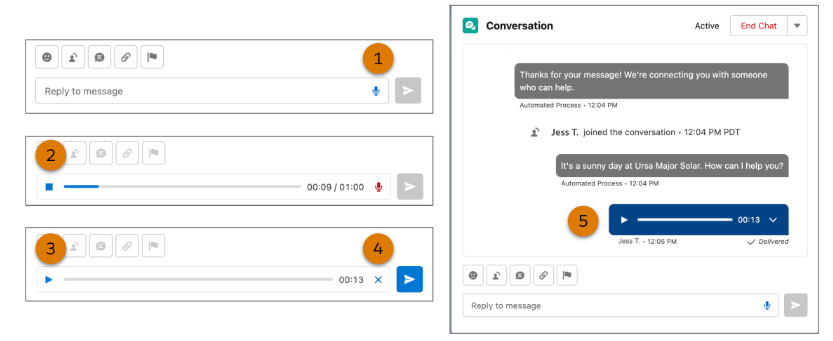
Voice is the new text, so make sure your agents don’t miss out. Agents can now easily record and send voice messages up to one minute long to customers in enhanced WhatsApp and enhanced Facebook Messenger channels. Previously, agents had to use a separate app to record messages and then send the audio files as attachments.

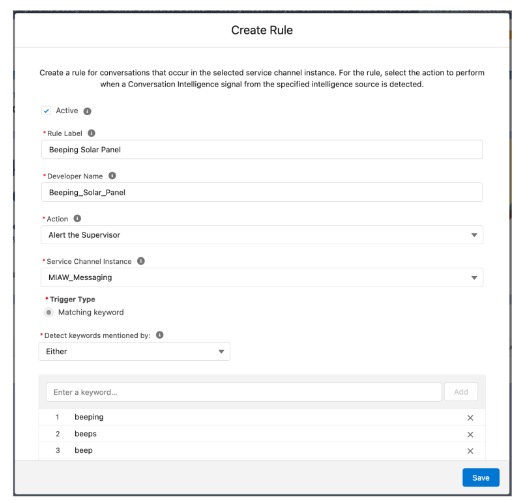
Create Real-Time Keyword Alerts for Supervisors in Messaging Channels

If a customer or agent sends a high-stakes keyword or phrase, automatically raise the agent’s flag so their supervisor can help if needed.

Message Customers More Intuitively with the Redesigned Agent Conversation Window

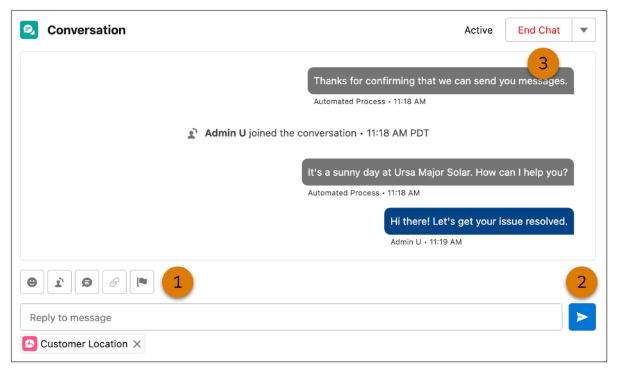
You asked, and Salesforce listened. The Send-and-End Chat buttons are now separated in the agent conversation window. Additionally, the toolbar now lives above the message field. These subtle changes help agents click the correct button and find the tools they need during messaging sessions.

Resolve Setup Issues More Quickly with Self-Service Checks (Beta)

Get your contact center users up and running more quickly with on-demand diagnostics. No need to troubleshoot or contact Salesforce Customer Support. Run the Single Sign-On service checks to verify that Service Cloud Voice can authenticate all agents and supervisors in your contact center. Run the Contact Center User service checks to verify that every contact center agent and supervisor is assigned the right permission set license and permission set. Without them, the user can’t use Service Cloud Voice.

Check Voice Channel Performance with More Metrics (Pilot)

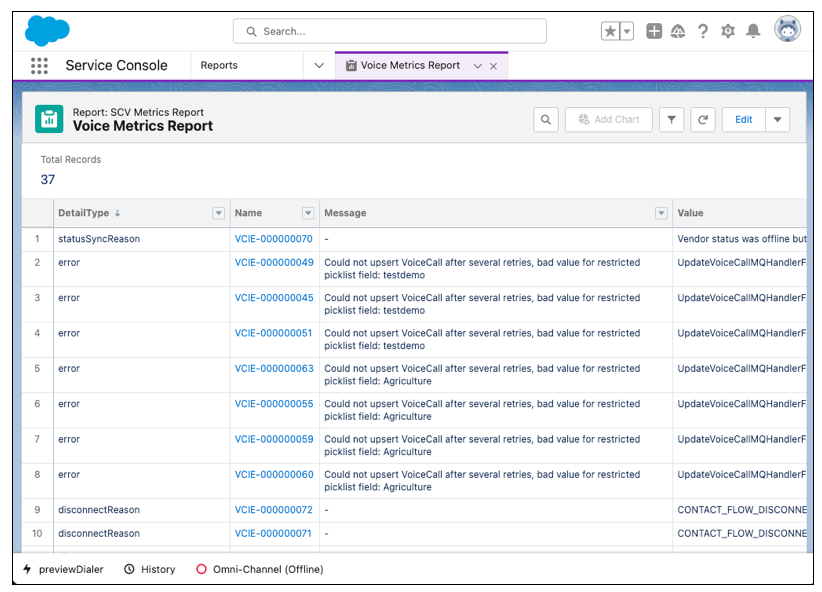
Evaluate the performance of your voice channel by adding two new Voice objects to your custom report types. Spot trends on disconnected calls, missed calls by agents, call error rates, and other call actions. Some metrics are only available for Service Cloud Voice with Amazon Connect. All data for the new Voice objects are deleted after 30 days.

Get the Enhanced Slack Conversations Experience

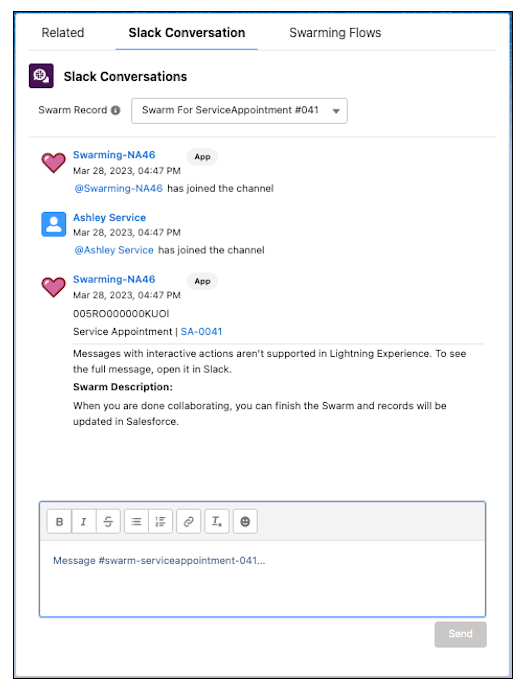
Collaborate on a Slack swarm from Lightning Experience with the enhanced Slack Conversations component that looks and feels more like Slack. To keep the experience consistent between Slack and Salesforce, Slack profile pictures now appear alongside the message, messages are left-aligned and timestamped, and users can see and send custom Slack emojis. Slack Conversations users can also view advanced Slack formats such as code and code blocks, easily identify attachments by a file emoji, send messages through Slack Connect, and even use the component on the go from a tablet.

Extend Swarming to Field Service Workers

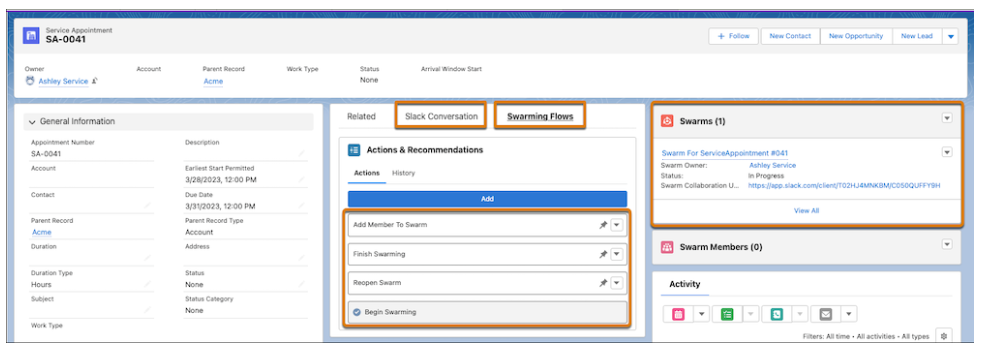
Bring the power of Swarming and Expert Finder to Field Service with Service Appointments, now supported for Swarming. Field service workers can bring together cross-functional experts to quickly resolve tricky customer issues, even when onsite with a customer, helping reduce your cost to serve.

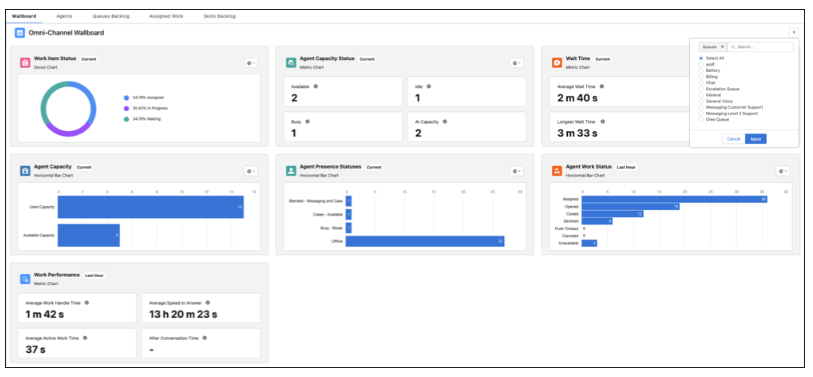
Monitor Contact Center Health in the Omni Supervisor Wallboard (Pilot)

Show supervisors real-time metrics to help them identify and resolve issues quickly. In this continuing pilot, the wallboard includes more charts. On the Omni Supervisor tab, supervisors can select a queue of interest to filter the metrics shown.

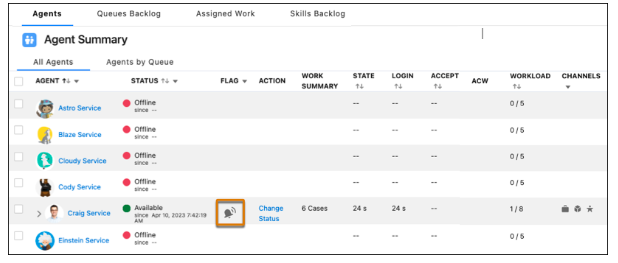
Get Supervisors Involved Fast with Conversation Intelligence

When conversation intelligence detects a key phrase in calls or messages, it raises a flag on the Agents tab in Omni Supervisor. Supervisors can then jump in and help agents resolve the issue quickly.

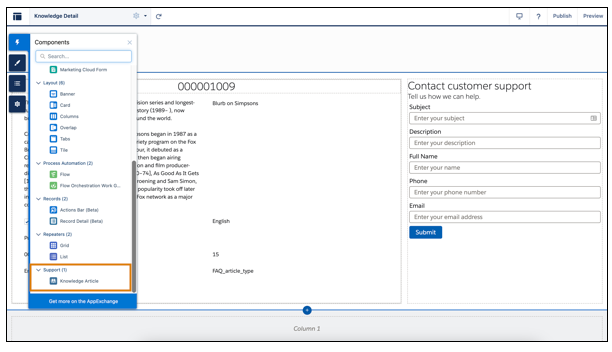
Surface Knowledge Articles Quickly

Help users self-serve and find solutions quickly with the new Knowledge Article page for LWR sites. Now you can add knowledge articles to your Self-Service portal’s Knowledge Article Details page.

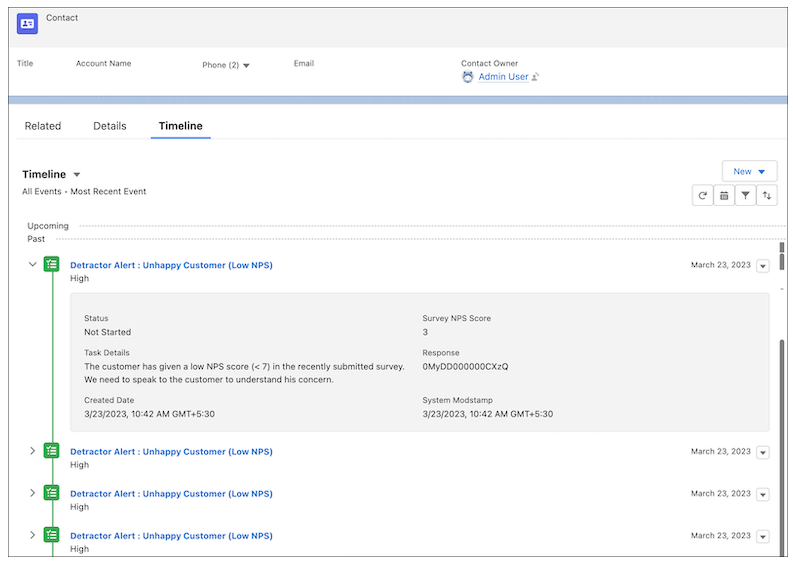
Get a Quick Timeline View of Survey Responses

Use Timeline to monitor survey responses. View information related to responses and understand respondents’ interaction. You can enable a Timeline for both standard objects and custom objects.

Customize Knowledge Articles with the Knowledge Article Component

Site visitors can now view knowledge articles in LWR. Administrators can toggle between field labels and field sections and adjust the style of the knowledge article title. Mandatory field labels, such as URL Name, that your site visitors don’t need are also hidden. And employees can customize knowledge articles in an unauthenticated help center and via an authenticated portal. Previously, the Knowledge Article component was available only in Aura, making it inaccessible to LWR users.

Learn More about the Salesforce Summer ’23 Release Notes

If you want to learn more about the exciting new features of the Salesforce Summer ’23 Release for Service Cloud, don’t hesitate to contact us and we’ll be happy to provide you with all the information you need.

About Corrao Group

As everyday Salesforce power users, Corrao Group understands how flexible the Salesforce platform is to support every business department. Since 2002, we have been helping B2B organizations of all sizes optimize their business processes with Salesforce and their third-party applications. We’ve worked with nearly 1,100+ customers, implementing, customizing, and optimizing over 2,150+ Salesforce projects. We are proud to be on the Consumer Goods Cloud Partner Advisory Board and Salesforce Managed Service Board, in addition to being the exclusive US launch partner of the Salesforce Trade Promotion Management (TPM) Pilot. If you want to learn more about how Corrao Group can help your company, read our reviews on G2!

Sources

Salesforce Summer ’23 Release: Service Cloud